Blog / Build note
My Kindle Scribe to-do list syncs with TickTick. Here's how.
By José Rosario ·
Every morning my Kindle Scribe shows me today’s to-do list from TickTick. When I tick a task with the pen, it’s ticked in TickTick too, on my phone and everywhere else.
Amazon doesn’t make the Scribe do this. I jailbroke mine and built an app for it called Pen Pal, and the to-do list is the part I use most. I don’t write code by hand; I describe what I want to Claude and test every version on the real Kindle.
Can the Kindle Scribe sync with TickTick or Todoist?
Not on its own. As of October 2026 there is no TickTick, Todoist or Google Tasks connection anywhere on the Scribe, and people ask about it all the time in the Scribe forums. Nothing built into the Scribe can show your task list, and a box ticked in a notebook stays in the notebook.
What does Amazon give you instead?
Three things come close.
- A checklist template. You can make a notebook with checkboxes and write your list by hand. It works like paper, which also means it knows nothing about your phone.
- Send to Alexa+. On the newest Scribes, in the US only, you can send a page of notes to Alexa+ and it will turn them into to-dos and reminders. Those land in Alexa. Amazon switched off syncing Alexa lists to other apps like Todoist in July 2024, so they don’t reach TickTick.
- Export to OneNote, Google Drive or OneDrive. That sends your notes out of the Kindle. Your tasks never come in.
There is also ReKindle, a web app you open in the Scribe’s own browser. Its Tasks page can sync with Google Tasks, and it doesn’t need a jailbreak. If you use Google Tasks and don’t want to jailbreak anything, try that first.
I use TickTick, and I wanted the list on the page I write on, so I built it.
What shows up on my Today page?
When I open Pen Pal, the first page is Today. At the top is a short note about the day. Below that are my plans and my to-dos as rows, and blank paper under them for whatever I want to write.
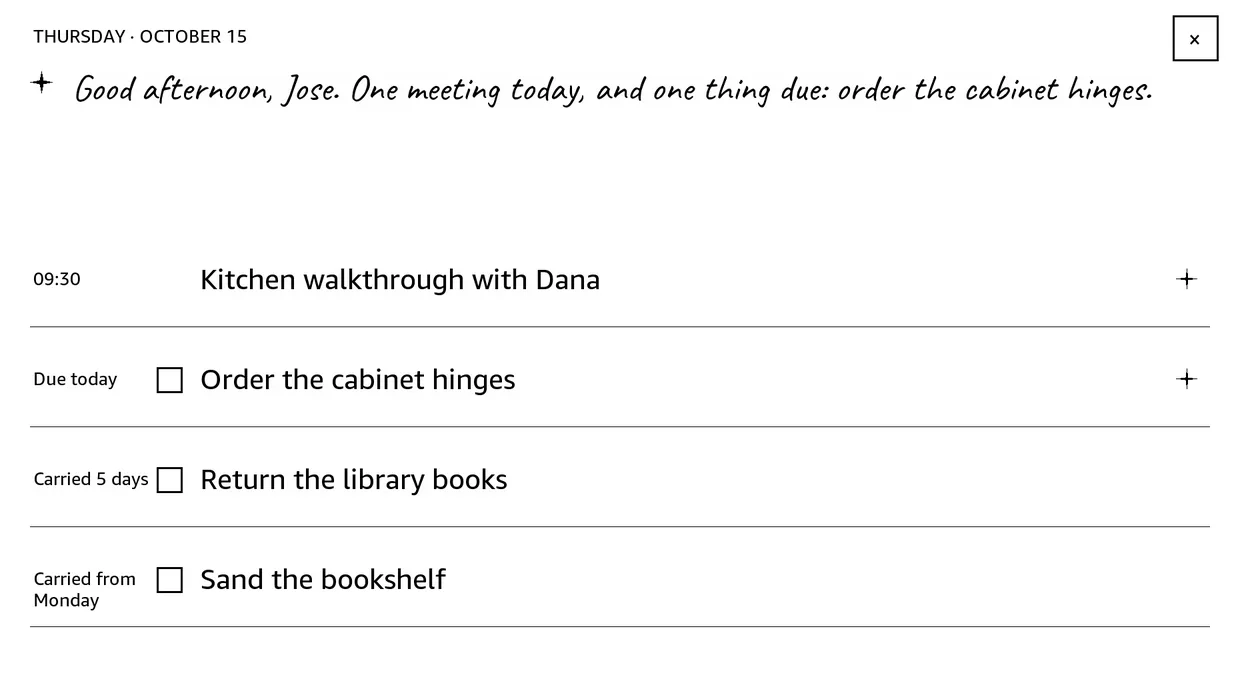
The Today page, filled with sample tasks for this screenshot. My real list stays private.
The list follows TickTick’s own Today view. A task shows up if it’s due today or overdue, from any list. A task with no date stays in TickTick, which keeps the page short. Five rows fit before it turns to a second page.
A task I didn’t finish comes back the next day marked “Carried from” the day it was due. After three days that turns into “Carried 3 days”, which is about as much guilt as I want from a Kindle.
Big, vague tasks get help. My assistant, Hermes, reads each task on Today that has empty notes and writes two to four first steps into its notes in TickTick, using my own notes on the topic. A small star on the row means there’s something to read, and tapping the star opens the task on its own page. If a task is already one quick action, it leaves it alone. It never writes over notes I wrote myself.
Can I tick a task with the pen and have it count?
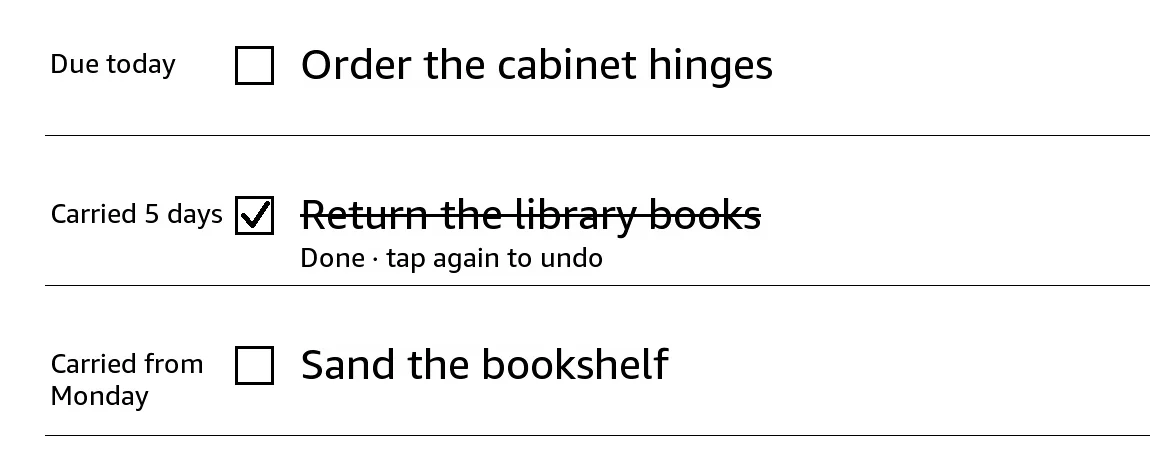
Yes. I tap the task and the row says “Done · tap again to undo”. For 60 seconds nothing leaves the Kindle, so a slip of the pen costs nothing. After that the row says “saving to TickTick”, the tick goes to my server, and the server marks the task done in TickTick.
It works the other way too. If I draw a small box on a page and write a line next to it, that line becomes a new task in my TickTick inbox, due that day. Writing “tomorrow” or “friday” at the end of the line moves the due date. The page has to sit untouched for ten minutes first, so a task I’m still writing doesn’t get sent half finished.
What happens when the wifi drops?
The tick waits on the Kindle and keeps trying.
Earlier this month I was on hotel wifi. I ticked a task just before midnight. The first four tries failed because the connection wasn’t letting anything out. The fifth went through about 20 minutes later. I didn’t have to do anything, and I didn’t know it had struggled until I went looking.
The bug that kept a finished task alive
The next morning, the task I’d ticked was still on my Today page. TickTick said it was done. My Kindle said “Carried 5 days”.
I asked Claude to find out why. It read the server logs and found that my tick had worked. The problem was the next step. Every hour the server asks TickTick for my open tasks and updates its own copy. Any task that’s missing from TickTick’s answer counts as finished.
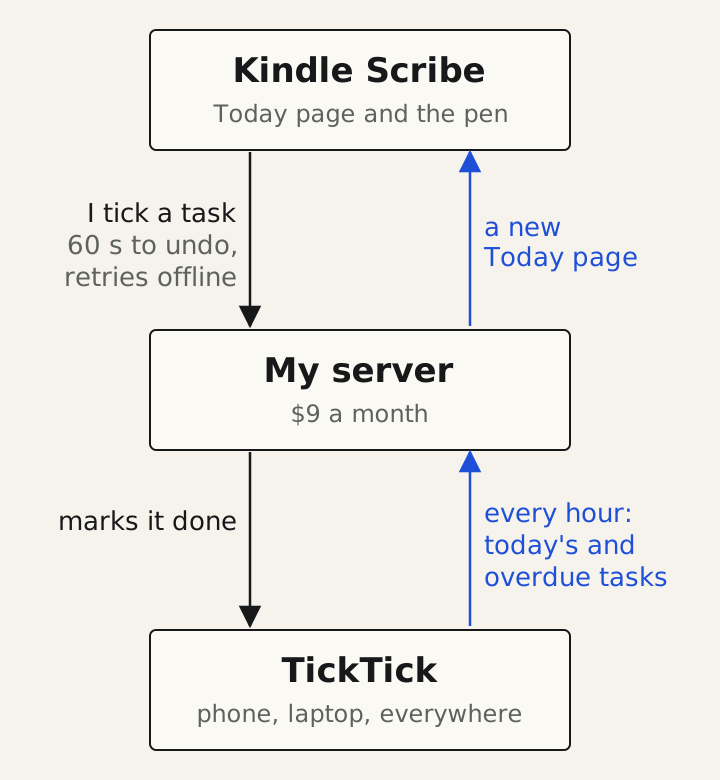
That task was my last open one. Once it was done, TickTick’s answer was an empty list, and the server had a rule that skipped empty lists as if there were nothing to do. So it never noticed the task had gone.
The fix was one line: treat an empty list as “everything is done”. Finishing every task on your list is the one situation a to-do app should handle well, and mine broke on it.
Would this work with Todoist or Google Calendar?
My calendar already shows on Today. Pen Pal reads it from Google Calendar, though it only reads; I can’t change an event from the Kindle.
Todoist would need its own connector on the server. The rest of the system was built so another task app can be added, but I haven’t built a Todoist one, so I can’t tell you it works.
Is it worth jailbreaking a Scribe for this?
For me, yes, though the to-do list wasn’t the only reason. My first Scribe post covers the risks: it can void your warranty, and a software update can undo it. Pen Pal also runs on a small server I rent for $9 a month, so this setup comes with a monthly bill.
If all you want is a synced task list and you use Google Tasks, ReKindle gets you most of the way without any of that.
Why put a to-do list on a Kindle at all?
I have ADHD, and my weak spot has always been sticking to a system. So I built Pen Pal to ask almost nothing of me. There’s no weekly review and nothing to file. I don’t pick a list for a new task; drawing a box is enough. Unfinished work rolls forward on its own, and a missed day doesn’t leave me a mess to clean up.
You can see the rest of Pen Pal, including a one-minute film of it answering a handwritten question, on the Pen Pal build page.
Quick answers
- Can the Kindle Scribe sync with TickTick or Todoist?
- Not out of the box. Amazon has no TickTick, Todoist or Google Tasks sync on the Scribe. Mine syncs with TickTick because I jailbroke it and built my own app for it, called Pen Pal.
- Does the Kindle Scribe have a built-in to-do list?
- It has a checklist notebook template you can write on, and on the newest Scribes in the US, Send to Alexa+ can turn your notes into to-dos inside Alexa. Neither one connects to a to-do app like TickTick or Todoist.
- Can I tick off a task on the Scribe and have it count in TickTick?
- On a stock Scribe, no. With Pen Pal, I tap a task with the pen, get 60 seconds to change my mind, and then it's marked done in TickTick.
- What happens if the Scribe has no wifi?
- The tick is saved on the Kindle and keeps trying until it gets through. Nothing is lost while it waits.